SNMP TRAP Introduction

SNMP Trap Basics

Network alarms play a vital role in network management by enabling continuous monitoring of device health and events. Devices that support SNMP (Simple Network Management Protocol) can report issues to a management system using TRAP or INFORM messages.

What Is an SNMP Trap?

An SNMP TRAP is an unsolicited message sent from a device to an SNMP management system whenever a specific event occurs.
A trap may include information such as:

  • Date and time

  • Severity level

  • Status

  • Interface or port

  • Probable cause

  • Vendor-specific details

The content and structure vary depending on the device vendor and MIB definitions.

Active vs. Cleared Traps

Traps typically fall into two categories:

  • Active Trap: Indicates that a new issue has occurred. When received, the management system logs the alarm and may notify the Network Operations Centre (NOC), especially if the severity is high.

  • Cleared Trap: Sent when the device resolves the issue. The management system matches this with the previously logged active alarm and updates its status to cleared.

Limitations of Standard SNMP Traps

Standard traps use UDP and do not require acknowledgment. This introduces several challenges:

  • If a trap is lost in transit, the management system will not know the event occurred.

  • Some vendors include a sequence number in traps, allowing the management system to detect missing traps.

  • In cases where trap loss is detected, the management system may issue SNMP GET requests to query active alarms directly—depending on the vendor’s implementation.

What Is an SNMP Inform?

An SNMP INFORM works similarly to a trap but adds reliability.
The key difference: the management system must acknowledge the INFORM message.

If the device does not receive a response, it will retry sending the INFORM. This ensures that critical alarms are not silently lost, making informs more reliable for important or service-impacting events.

SNMP TRAP v INFORM

Feature Trap Inform
Requires acknowledgment? No Yes
Delivery reliability Low High
Network/CPU overhead Low Moderate
Use case General alerts Critical alerts needing confirmation

SNMP TRAP/INFORM Severity

Severity Description Example
Critical Service-impacting failure. Power supply failure, router reboot, critical link down.
Major Serious issue that may impact service soon. High CPU load, redundant component failure (fan, PSU).
Minor Non-service-impacting problem or early warning. Temperature warning, intermittent errors.
Warning Abnormal behavior that may develop into a problem. Approaching memory limits, rising error counters.
Informational (Info) Non-problem event. User login, config change, interface up.
Normal / Cleared Indicates return to normal state. Alarm cleared after issue resolved.

SNMP TRAP/INFORM application example:
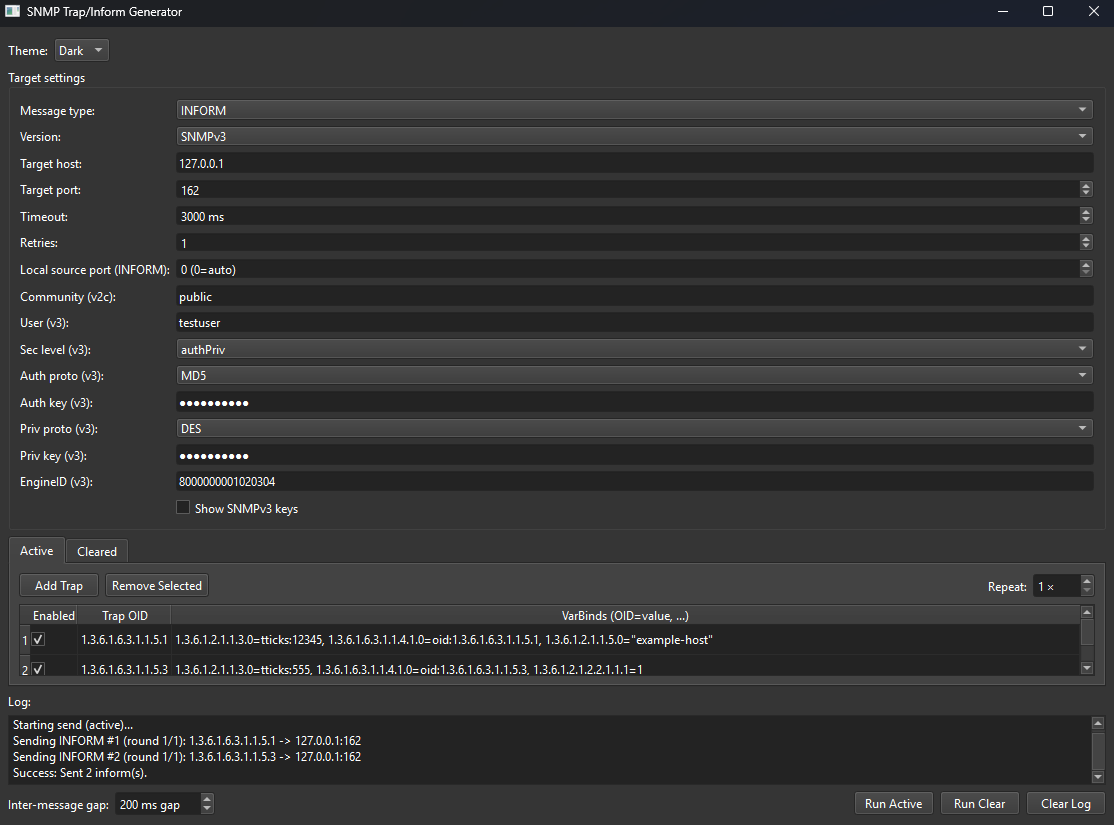
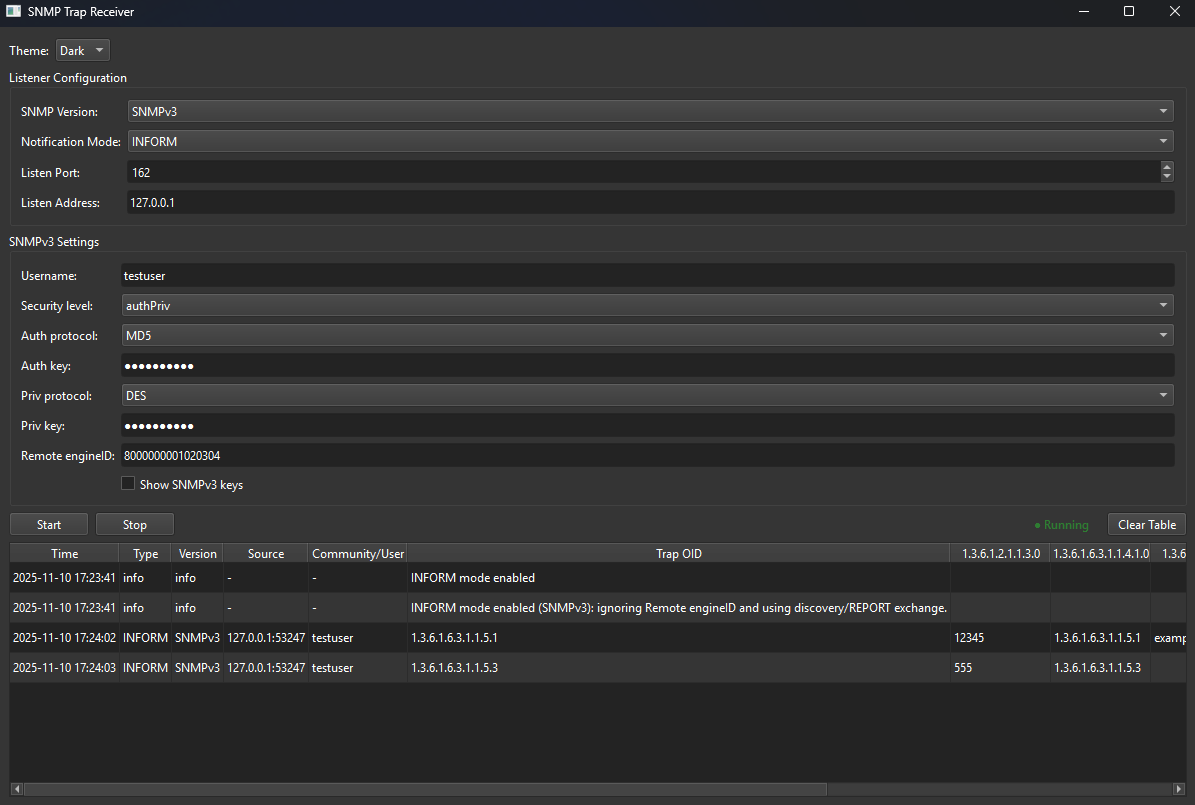
The application below shows the management system alarming component as a standalone example on how traps are received and generated for both SNMP TRAP and INFORM and can be used as a testing tool within a lab or network management software development.

SNMP Trap Receiver (Windows)

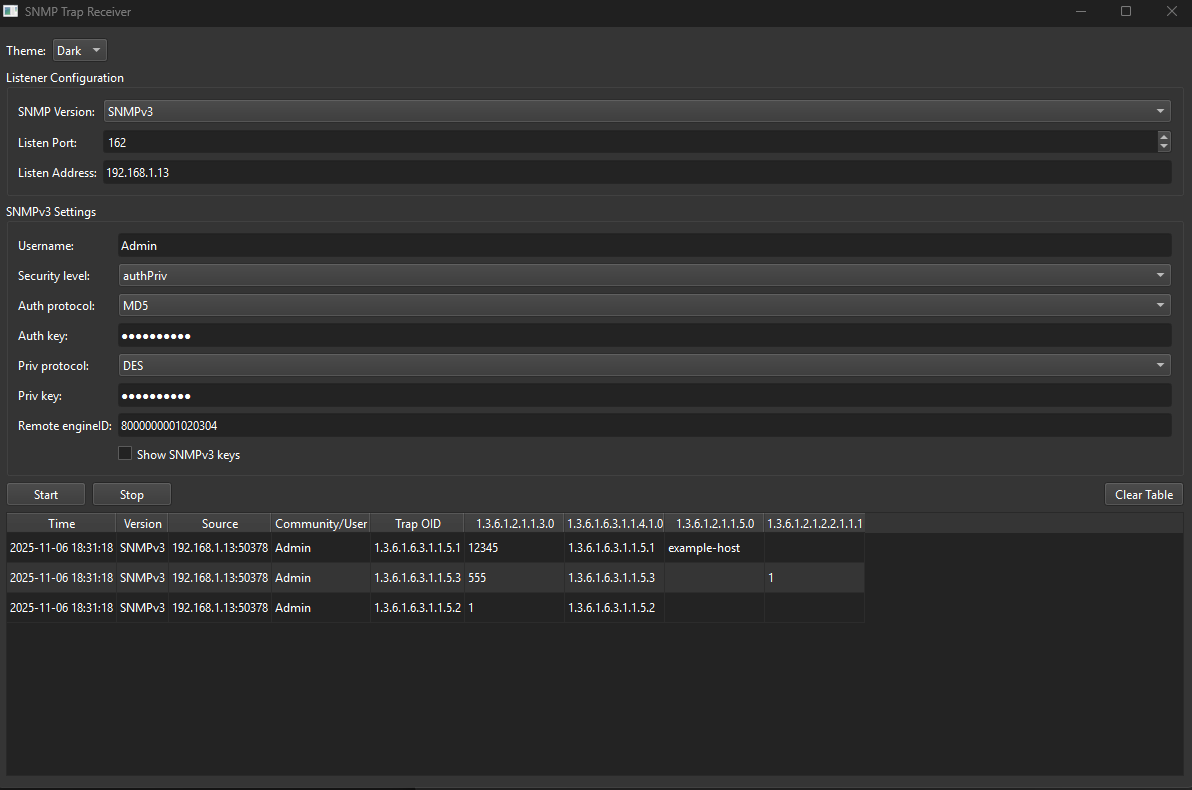
A Windows server desktop application for receiving and inspecting SNMP traps across SNMPv1, SNMPv2c, and SNMPv3. It provides a clean GUI with start/stop controls, dark/light themes, CSV persistence of listener settings, and a dynamic table that expands to show every varbind carried in each trap.

It’s purpose is three fold; it allows for real network or servers to send SNMP traps to this app and to display the received traps for testing. Secondly the trap generator allows for custom or vendor traps to be configured and send to a lab NMS and development of an NMS for small scale testing with the absence of real devices generating SNMP traps.

Key features

  • Multi-version support: Toggle between SNMPv1, SNMPv2c, and SNMPv3.

  • SNMPv3 ready: Configure user, security level (noAuthNoPriv, authNoPriv, authPriv), auth/priv algorithms (MD5/SHA… AES/DES/3DES), keys, and remote EngineID (hex).

  • EngineID handling for traps:

    • If you provide a remote EngineID, the app binds credentials to it immediately (recommended for TRAPs).

    • If not provided, the app auto-learns EngineID from incoming packets and binds on the fly, then logs an info row.

  • Shows undecodable v3 traps: Even if credentials are wrong, the app inserts a row noting “unable to decode” (with the USM error) so you can see activity and debug.

  • Dynamic varbind columns: The table starts with base columns (Time, Version, Source, Community/User, Trap OID) and adds new columns per OID as traps arrive, so mixed traps with different varbind sets are handled gracefully.

  • Start/Stop without hangs: Background listener runs in a QThread; a tiny UDP “wakeup” packet cleanly unblocks the dispatcher on stop.

  • Theme toggle: Global Light/Dark (Fusion) palette switcher.

  • CSV persistence: Saves/loads listener configuration (version, address/port, communities, v3 credentials, EngineID, theme) to receiver_settings.csv.

  • “Clear Table” button: Quickly reset the view and remove all dynamic varbind columns.

How it works

  • Uses pysnmp’s asyncore UDP transport and ntfrcv.NotificationReceiver to capture traps.

  • Registers observers:

    • rfc3412.receiveMessage:request to learn source address and remote EngineID early.

    • rfc3414.processIncomingMsg to surface USM failures as visible “info/error” rows.

  • On each decoded trap, the app extracts snmpTrapOID.0 (or falls back to the first varbind) and prints every varbind (OID → pretty-printed value).

  • A column cache maps OIDs → table columns; unseen OIDs create new columns on demand.

Usage

  1. Choose SNMP Version.

  2. Set Listen Address (e.g., 0.0.0.0) and Port (e.g., 162 or a higher unprivileged port like 5162 during development).

  3. For v1/v2c: set Community.

  4. For v3: set User, Security Level, Auth/Priv algorithms/keys, and optionally Remote EngineID (hex).

  5. Click Start to begin listening; Stop to end; Clear Table to reset the view.

  6. Use the Theme dropdown to switch between Light/Dark.

Notes & tips

  • Permissions: On many systems, port 162 requires elevated privileges; during testing, use a higher port on both sender and receiver.

  • v3 traps & EngineID: TRAPs are one-way; the receiver can’t discover EngineID via time sync like INFORMs. Providing a matching Remote EngineID is the most reliable approach. If omitted, the app auto-learns it from incoming packets and binds credentials for subsequent traps.

  • Auth/Priv key lengths: Ensure keys meet the chosen algorithm’s expectations and match the sender exactly.

  • Troubleshooting:

    • If you see an “unable to decode” v3 row, check user/algorithms/keys/engineID.

    • Firewall/AV may block UDP; allow inbound on the chosen port.

    • If stop ever seems slow, it’s waiting for the dispatcher loop to wake; the app sends itself a tiny UDP packet to exit promptly.

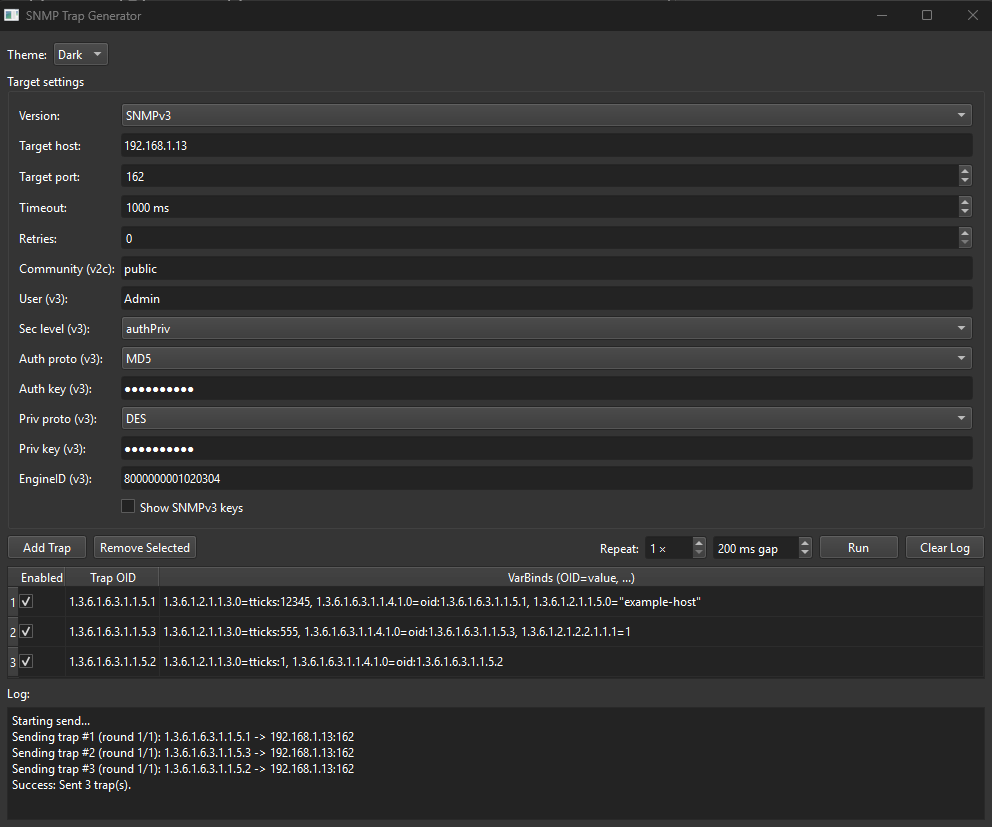
SNMP Trap Generator (Windows) - Testing and Educational purposes only

A desktop utility for composing and sending SNMP traps over SNMPv2c and SNMPv3. It’s designed for testing receivers, validating credentials, and simulating real-world events. The app provides a table to define one or more traps (each with custom varbinds), batching/repeat controls, v3 security options, a theme switcher, live log, and CSV persistence.

Key features

  • SNMP versions: Send traps using SNMPv2c (community) or SNMPv3 (USM).

  • SNMPv3 security: Choose security level (noAuthNoPriv, authNoPriv, authPriv) with algorithms:

    • Auth: None, MD5, SHA, SHA224, SHA256, SHA384, SHA512

    • Priv: None, DES, 3DES, AES128, AES192, AES256

  • Fixed EngineID (v3): Supply a hexadecimal EngineID so receivers that expect a stable engine can authenticate/decrypt your TRAPs reliably. The app sets it in a version-compatible way across pysnmp builds.

  • Trap composition table: Define multiple traps:

    • Column 1: Enabled checkbox

    • Column 2: Trap OID (numeric or named, e.g. 1.3.6.1.6.3.1.1.5.3 or SNMPv2-MIB::coldStart)

    • Column 3: VarBinds as OID=value pairs, comma-separated

  • Repeat & pacing: Send each enabled trap N times with a configurable inter-trap gap (ms).

  • Live log: Progress and errors stream into a log pane; Clear Log button included.

  • CSV persistence:

    • traps.csv stores your trap rows (enabled flag, Trap OID, VarBinds).

    • generator_settings.csv stores target, timeouts, version, v3 credentials and EngineID, and theme.

    • Files auto-load on start and auto-save as you edit.

  • Light/Dark theme: Toggle via the top bar (Fusion palette).

VarBind input syntax

Write varbinds as a comma-separated list of OID=value. OIDs may be numeric or names; values support lightweight typing:

  • Strings: "hello" or 'hello'

  • Hex bytes: 0x48656c6c6f (even length)

  • IP address: ip:192.0.2.10

  • OID value: oid:1.3.6.1.2.1.1.5.0

  • TimeTicks: tticks:12345

  • Integers / Counters / Gauges: 42, c32:100, c64:1000, u32:7

Usage

  1. Pick Version (v2c or v3) and set Target host/port (e.g., your receiver).

  2. Configure Timeout/Retries.

  3. For v2c: set Community.
    For v3: set User, Sec Level, Auth/Priv algos and keys, and EngineID (hex).

  4. Add or edit trap rows, mark desired ones Enabled.

  5. Choose Repeat and gap (ms), then click Run.

  6. Watch progress in Log. Use Clear Log to reset.

Tips

  • During development on Windows, prefer an unprivileged port (e.g., 5162) on both generator and receiver.

  • For SNMPv3 TRAPs, a fixed EngineID often avoids “unknownEngineIDs” on receivers and speeds up successful decryption.

  • Auth/Priv keys must match the receiver’s expectations (algorithm + key material).

  • If you see an error in the log, verify OIDs, varbind syntax, credentials, and network/firewall rules.

This tool pairs nicely with the companion SNMP Trap Receiver app: keep the receiver open on the chosen port and security settings, then use the generator to simulate events end-to-end.contents.

SNMP Trap Generation Option

Screenshot of SNMP Trap Generator software window with dark theme, showing target settings, trap configurations, and log details.

SNMP Trap Receiver Option

Screenshot of a network monitoring or SNMP trap receiver software interface with configuration settings and a log table displaying recent trap events.

SNMP Trap Inform Generator Option

Screenshot of SNMP Trap/Inform Generator software interface showing configuration settings for generating SNMP traps and informs, including community, user, security level, authentication, and trap IDs.

SNMP Trap Inform Receiver Option

Screenshot of SNMP Trap Receiver software configuring SNMPv3 with user 'testuser', security level 'authPriv', and encryption keys, showing status logs and settings.